
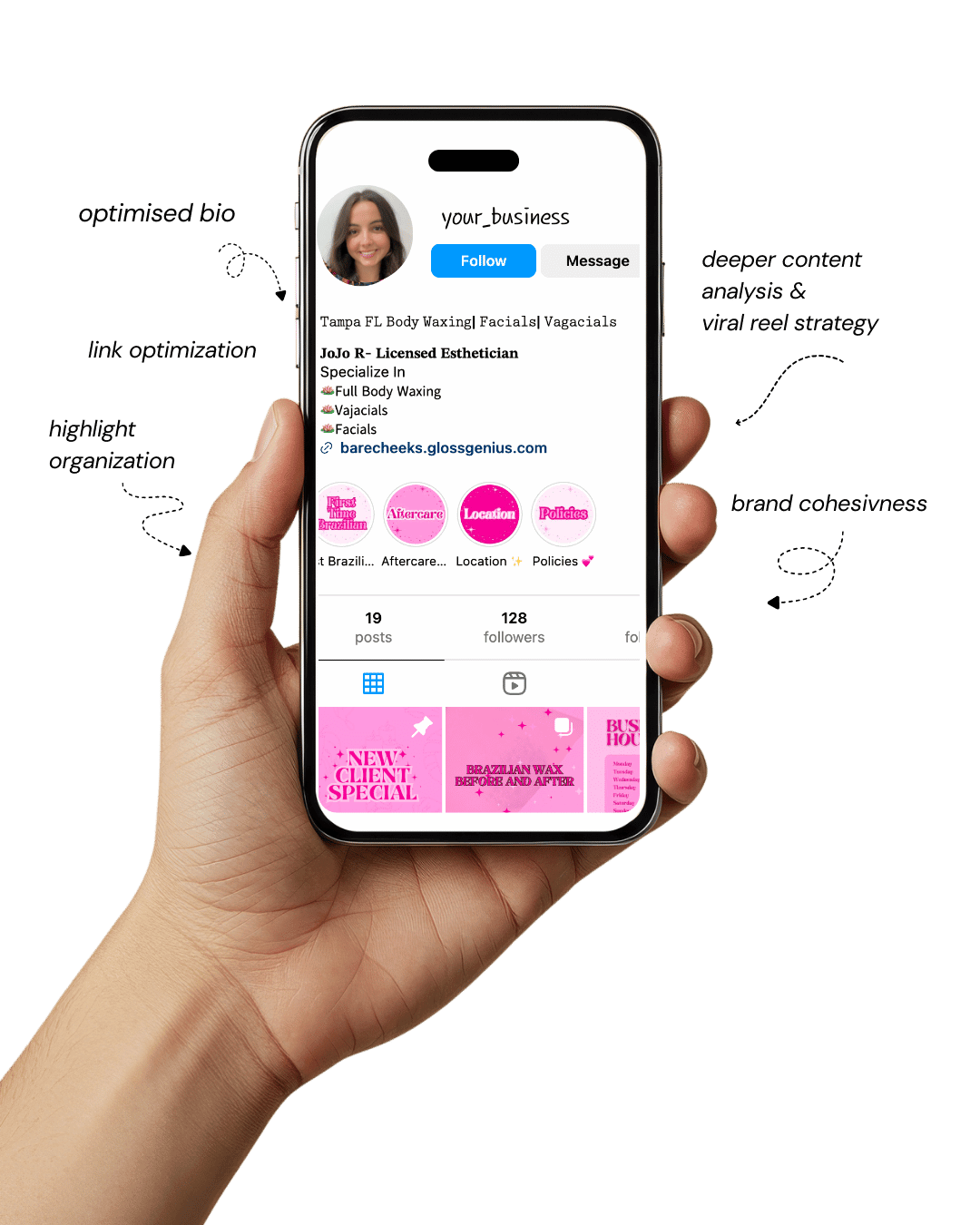
Your Instagram isn’t the problem.
The strategy is.
Get a free, honest audit of your Instagram profile — tailored for beauty, wellness & creative brands.
You’ll receive: profile fixes · content gaps · bio upgrades · content ideas.
I personally review your profile and send a clear, actionable breakdown — no AI, no templates.
Canva templates ideas have become a game changer for creators, small business owners, and digital sellers.
In a world where content moves fast, the ability to produce professional, branded designs without hiring a designer creates a massive advantage.
Whether you’re launching an Etsy digital downloads shop, creating Pinterest assets, offering services, or managing your personal brand, editable templates can save you hours of design time and help you earn passive income.
The beauty of Canva templates ideas is that they can be customized endlessly — fonts, colors, layouts, images, and brand elements can all be swapped in seconds.
Creators today don’t just want graphics — they want customizable systems. Templates ensure consistency and streamline your workflow so you can focus on marketing and monetization instead of getting stuck designing from scratch.
The real business edge comes from producing templates that are visually appealing and strategically structured.
Combining aesthetics with thoughtful design is what attracts buyers and grows your brand.
With the right Canva templates ideas, you can package your creativity into products that help others stay organized, boost engagement, and elevate their online presence.
Why Using Templates Matters for Creators

Using Canva templates ideas simplifies the entire design process and increases productivity. When your templates are pre-designed with alignment, spacing, and visual hierarchy, creating new posts becomes plug-and-play instead of overwhelming.
Templates prevent creative burnout because you’re not starting with a blank screen every time. Instead, you’re updating something that already works.
From a business angle, editable templates can become sellable digital products. That’s why Etsy and Gumroad shops focused on Canva templates ideas are booming — people want ready-made designs they can personalize quickly.
Templates also support better brand consistency. By using the same grid structure, color palette, and typography across your content, your branding becomes visually recognizable and easier to scale across multiple platforms.
A professional touch creators often overlook is using Brand Kits inside Canva so fonts and colors apply automatically.
With the right Canva templates ideas, you can streamline your workflow, amplify your brand presence, and even build passive income through digital downloads.
1. Instagram Carousel Templates
Instagram carousels are one of the most profitable Canva templates ideas you can create because they naturally boost engagement.
Users swipe intentionally, which increases time spent on the post — something Instagram’s algorithm loves. A carousel template should guide the reader, not overwhelm them.
Start with a bold hook slide, follow with structured content slides, and end with a compelling call to action.
Keep a consistent grid throughout the template by turning on Canva’s ruler and smart guides; this maintains alignment across every slide.
Designers often overlook typography spacing — fix this by setting line height between 1.2–1.4 for readability.
Another professional touch is duplicating your slide rather than starting from scratch; this keeps visual flow consistent.
These Canva templates ideas are excellent to sell on Etsy because every social media manager needs swipe-worthy content that’s editable and on-brand within minutes.
2. Pinterest Pin Templates
Pinterest thrives on visual search, which is exactly why Pinterest pins are powerful Canva templates ideas for digital sellers.
Vertical images dominate the feed, so stick to 1000×1500 px for optimal performance. Your design needs hierarchy: punchy headline, supporting text, and a focal image.
Instead of placing text directly on a busy background, add a transparent overlay — 10–20% opacity — to make headlines crystal clear without losing the aesthetic.
Canva’s “Resize” tool is a huge time saver here; duplicate a template and instantly convert it to other dimensions for multi-platform use. The biggest mistake beginners make is using inconsistent spacing.
Fix this by setting margins and turning on “Snap to Guides.” These Canva templates ideas consistently sell well because bloggers and Pinterest marketers constantly need fresh pin graphics to drive traffic to their content.
3. Business Branding Templates
Branding kits are high-ticket Canva templates ideas because they give small business owners a ready-to-use visual identity.
Your template should include logo variations, color combinations, font pairings, and social media layout options.
Many template creators overlook spacing — set automatic margins (e.g., 40 px) and keep alignment locked so users don’t accidentally move elements.
Inside Canva, create multiple logo options: primary, secondary, and submark, so the client feels like they’re buying a premium solution.
Use free-for-commercial-use fonts unless you’re targeting advanced designers who don’t mind licensing fonts separately. For a polished look, add brand strategy pages such as tone of voice and imagery direction.
Business owners love these Canva templates ideas because they eliminate decision fatigue and deliver instant branding without hiring a graphic designer.
4. Digital Planner Templates
Digital planners are some of the most profitable Canva templates ideas on marketplaces like Etsy.
Planners appeal to people who want structure — students, entrepreneurs, and organization lovers. The key to high-quality planners is precision.
Use tables and alignment tools so every column and row is perfectly spaced; this gives the design a clean professional feel.
Leave enough writing space, especially if people print them. If you’re exporting as a PDF, turn on hyperlinking within Canva.
This allows navigation between tabs — monthly view, weekly spread, habit tracker—which elevates the user experience and increases perceived value.
A digital planner that blends aesthetics with functionality will always sell. These Canva templates ideas are timeless because planning and productivity never go out of style.
5. Ebook Templates
Ebooks are powerful Canva templates ideas because they help creators turn knowledge into revenue.
Instead of designing page by page manually, build a system: a variety of page layouts such as chapter intros, quote pages, visual charts, and worksheets.
When designing, set a clear type hierarchy: header size, subheader size, and body text spacing.
Adjust line height to avoid heavy text blocks—1.4 to 1.6 works best for long reading pages.
Canva’s “Apply Style” feature helps users change fonts and colors with one click, turning your design into a fully branded asset.
Coaches, authors, and course creators constantly need ebook templates for digital products.
These Canva templates ideas sell well because they help people publish quickly while looking professional.
6. Course Workbook Templates
Course workbook templates are excellent Canva templates ideas because educators rely on structured delivery. Every workbook should guide a student from understanding to action.
Include lesson prompts, reflection questions, and space for application.
Use invisible grids in Canva to maintain alignment so text doesn’t float awkwardly on the page.
The workbook template must be distraction-free — clean layouts, purposeful whitespace, and readable typography.
Exporting in two formats sets your product apart: PDF for printing and PNG for digital fill-in. Course creators love templates that minimize design time and maximize student clarity.
For sellers, these Canva templates ideas are profitable because every new course means another workbook.
7. Media Kit Templates
Media kits are one of the most in-demand Canva templates ideas because influencers use them to pitch paid collaborations.
A professional media kit needs sections for analytics, audience demographics, testimonials, and package rates.
Instead of overcrowding pages, emphasize hierarchy — large headlines, balanced white space, and clear metric placement. Canva’s chart tool transforms statistics into polished visual graphs, which instantly elevates credibility.
Photographs should be high resolution; use Canva’s background remover to keep the design clean. Many media kit buyers prefer templates that look editorial rather than overly colorful.
These Canva templates ideas sell consistently because influencers update their media kits every few months as their metrics grow.
8. Resume & CV Templates
Resumes are evergreen Canva templates ideas because people constantly apply for jobs. Emphasize spacing — set equal margins and pay attention to line consistency.
A minimalist layout with structured sections — experience, skills, education — keeps recruiters focused on key information. Fonts should be limited to two: one serif or display font for headings and a sans serif for body text.
Export resumes in both PDF and Word format so buyers can use whichever works best for their application. Selling a matching cover letter template boosts perceived value.
Well-designed resume templates never go out of demand, making these Canva templates ideas reliable income builders.
9. Lead Magnet Templates
Lead magnets are irresistible Canva templates ideas because businesses need them to grow email lists. Create editable templates for checklists, cheat sheets, and mini-guides.
Use columns to make text easy to skim and leave spacing around elements so nothing feels cramped.
Canva’s “Brand Kit” feature makes it easy for buyers to insert their brand colors and logo, which increases usability.
When designing lead magnets, keep visuals minimal and content-focused to avoid overwhelming the reader.
Exporting as a PDF ensures formatting stays consistent when shared through email marketing platforms.
These Canva templates ideas convert well because businesses always need new lead magnets for funnels, freebies, and opt-in incentives.
10. Webinar Slide Deck Templates
Webinar slides are strong Canva templates ideas because creators always need polished presentations.
Build layouts in a sequence that matches teaching flow: title slide, agenda, content slide, testimonial, and CTA.
A common mistake is inconsistent placement — use Canva’s Position tool to lock header spacing across slides. Keep text minimal and allow visuals to support the message. Add an image placeholder frame so users can swap pictures easily.
The magic feature here is “Resize,” allowing the slide deck to be repurposed into Instagram carousels or Pinterest graphics.
Selling slide decks works extremely well because these Canva templates ideas help creators present confidently with zero design stress.
11. YouTube Thumbnail Templates
YouTube thumbnails are conversion-driven Canva templates ideas because thumbnails determine click-through rate. Use expressive subject photography, high-contrast backgrounds, and short punchy text.
Canva’s background remover isolates the subject and lets you add subtle depth with drop shadows. The key is simplicity: face, text, emotion.
Avoid cluttered compositions that reduce readability. You can also create multiple thumbnail variations so the creator can A/B test. Since YouTubers post weekly, they need templates they can update in minutes.
These Canva templates ideas sell well on Etsy because every creator wants faster workflow and higher click-through rates.
12. Email Newsletter Header Templates
Email templates are strong Canva templates ideas because businesses want beautiful emails without coding.
Focus on creating crisp header graphics, dividers, and CTA buttons that visually guide the reading experience.
Export graphics as PNG to maintain sharpness when uploaded to email platforms like Flodesk or ConvertKit.
Use consistent spacing and avoid color heavy backgrounds that take away from the message. Templates that visually separate sections help improve readability and click-through rate.
These Canva templates ideas save users time and ensure every email matches their brand identity, making them attractive digital products.
13. Pricing Guide Templates
Pricing guide templates are high-converting Canva templates ideas because freelancers need professional visuals when presenting their offers.
Use subtle branding, clear price breakdowns, and well-defined package tiers.
Layout structure matters: header, deliverables, value explanation, and price. Replace dense paragraphs with short statements to enhance clarity. Add icons to reinforce section distinctions without cluttering the page.
When a pricing guide looks premium, clients perceive the service as premium. These Canva templates ideas help freelancers confidently pitch their rates and reduce negotiation stress.
14. Podcast Episode Templates
Podcast graphics are reusable Canva templates ideas because podcasters post visuals every time a new episode launches.
Stick to fixed alignment so the user only swaps text and image without rearranging layout. Include variations such as episode covers, guest announcements, and audiogram visuals.
Canva has an audio waveform element you can overlay to create dynamic motion-style graphics. Use the Brand Kit so the colors stay consistent across platforms like Instagram and YouTube.
These Canva templates ideas are efficient for podcasters who want to streamline their content creation without hiring a designer.
15. Vision Board / Mood Board Templates
Mood boards are aesthetically pleasing Canva templates ideas because they allow users to collect inspiration visually.
Use layered frames, textured backgrounds, and typography that leans toward elegant and editorial. Instead of random placement, build a balanced structure with asymmetrical layout blocks — this gives a curated look.
Vision boards work for designers, planners, brands, and even personal manifestation practices.
They’re evergreen digital products because people love planning for new seasons, goals, and projects.
These Canva templates ideas sell extremely well on Pinterest and Etsy due to their universal appeal and emotional connection.
How to Elevate Your Template Creation

Refine your process using these advanced steps:
Strategic Structure
Before designing, sketch out your template flow. Assign each page or slide a purpose. Templates perform better when users instinctively know where content should go.
Brand Kit Automation
Upload brand fonts, logos, and colors into Canva’s Brand Kit so users only need to click “Apply brand style.” This feature instantly transforms your whole template pack.
Use Smart Sizing & Export Settings
Always export at high resolution (300 DPI for printable products, PNG for digital use). When selling templates, offer multiple sizes using Canva’s Resize tool.
Less is more
Minimal designs convert better because users want freedom to customize. Don’t overcrowd layouts—give the design space to breathe.
When applying Canva templates ideas, the goal is not just beauty. The goal is usability and structure.
Final Words
Great templates are more than “pretty designs” — they are practical tools that help creators save time, stay on-brand, and grow their businesses.
With the right Canva templates ideas, anyone can create digital products that are profitable and easy to customize.
Whether you’re designing for your own brand or selling template packs online, focus on clarity, structure, and usability.
Each template should solve a problem: saving time, simplifying branding, or streamlining workflow. That’s what makes your work valuable.