
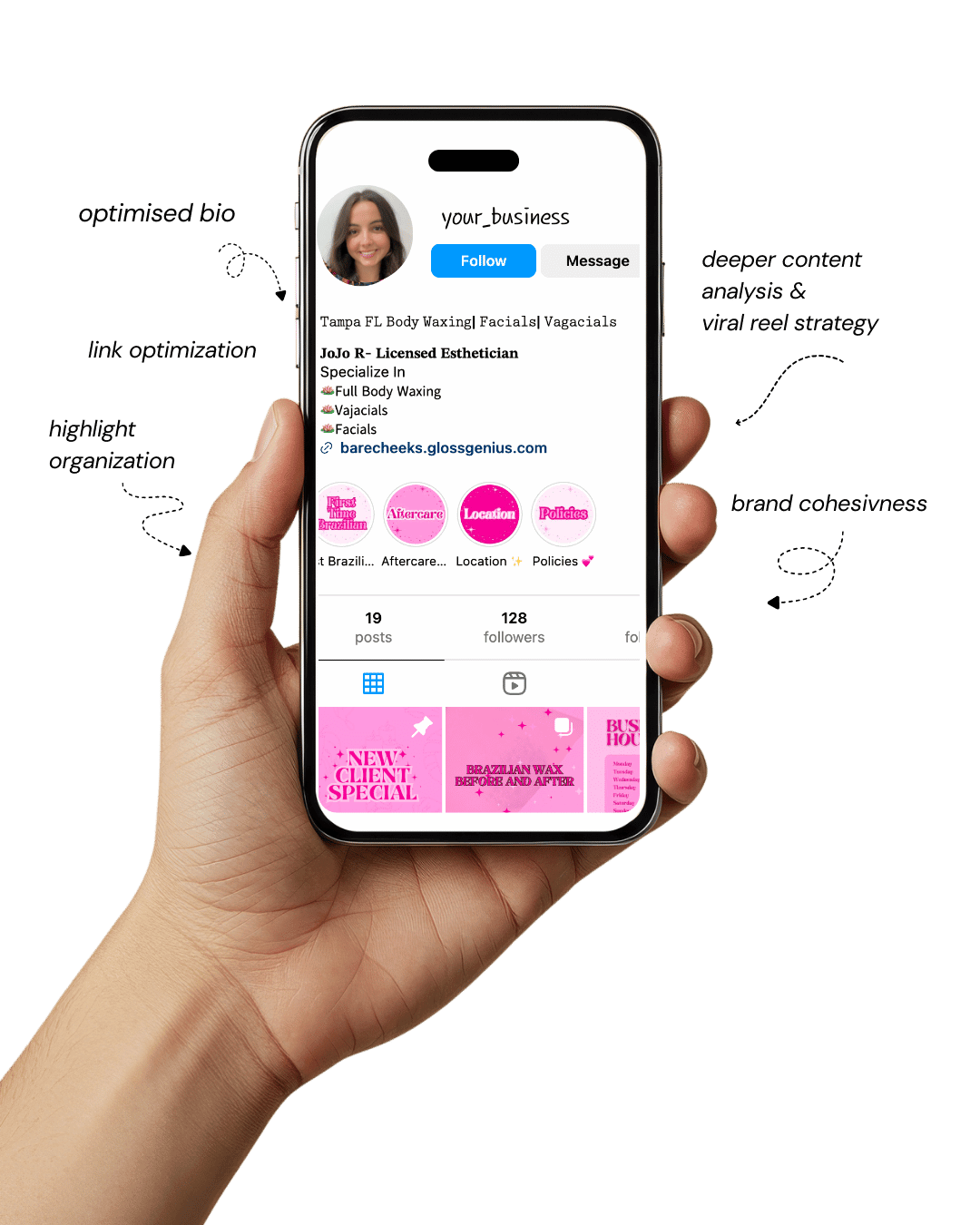
Your Instagram isn’t the problem.
The strategy is.
Get a free, honest audit of your Instagram profile — tailored for beauty, wellness & creative brands.
You’ll receive: profile fixes · content gaps · bio upgrades · content ideas.
I personally review your profile and send a clear, actionable breakdown — no AI, no templates.
The right Canva templates ideas can turn your message from “just another post” into something that feels authentic, polished, and totally you.
Especially If you’re a coach, consultant, or service provider, you already know that visuals can make or break how people perceive your brand.
Whether you’re sharing tips on Instagram, creating client guides, or building digital downloads for your audience, Canva gives you the creative freedom to do it beautifully — even if design isn’t your thing.
The beauty of Canva is that it bridges creativity and strategy. You don’t need to be a pro designer to create visuals that align with your message and attract dream clients.
What you do need are templates that work with your business — layouts that save you time, showcase your personality, and keep your brand consistent everywhere it shows up online.
Let’s explore some Canva templates ideas that not only look stunning but actually help you grow your coaching or service-based business effortlessly.
Design That Speaks Your Brand and Why It Truly Matters

Your visuals are often the first conversation your audience has with you — before they ever read your words or click your links.
In today’s visually driven world, your Canva designs are more than pretty graphics; they’re a reflection of your values, expertise, and energy.
For coaches and service providers, consistent and intentional design builds trust. Every post, guide, or workbook you share becomes a piece of your brand story.
When someone sees your Canva templates across multiple touchpoints — Instagram, Pinterest, email — and they all feel aligned, that cohesion tells them you’re the real deal.
Strong visual branding also saves you mental energy. Instead of starting from scratch every time, you can rely on a well-designed Canva template system that makes your content creation smooth and strategic.
With a few tweaks — fonts, colors, and textures — you can communicate your unique essence without losing hours to design decisions.
1. Client Welcome Packet Templates
When a new client signs on, their first experience with your brand sets the tone for everything that follows.
That’s where Canva templates ideas like client welcome packets come in. They give your onboarding process structure, professionalism, and warmth — without the overwhelm.
Think of this packet as your digital handshake. Inside, you can include a heartfelt welcome note, a breakdown of what to expect, your coaching policies, communication guidelines, and a simple visual roadmap of their journey.
This not only looks polished but also reassures clients that they’re in capable, organized hands.
Design-wise, start with an A4 portrait layout in Canva and use soft, neutral tones — like blush, taupe, or muted teal — that align with your brand energy.
Elegant serif headers (around 48 pt) paired with clean sans-serif body text (20–24 pt) create a refined balance. Add gentle background textures or line art for personality.
Pro tip: embed clickable links to scheduling tools, contracts, or resource folders before exporting as a PDF (with “Flatten PDF” unchecked) to keep links active.
These Canva templates ideas not only save you from redesigning every time but also make your clients feel instantly cared for. That’s the kind of first impression that lasts.
2. Social Media Content Bundles
Social media consistency can make or break your brand presence. Canva templates ideas for social media content bundles let you batch-create visuals that feel cohesive and on-brand.
Instead of designing from scratch, you simply update text, photos, and colors — saving hours each week.
Start with a 1080×1080 px canvas for Instagram posts and 1080×1920 px for stories.
Pick one accent color that complements your palette and repeat small design motifs (like brush strokes, circles, or icons) for instant brand recognition.
Use Canva’s “Styles” feature to apply your brand fonts and colors across multiple templates in one click — a major time-saver.
Add your logo as a watermark (20–30% transparency) to subtly reinforce your brand without overpowering your visuals.
Pro tip: Organize your Canva templates by content type — “Testimonials,” “Tips,” “Quotes,” and “Promos.”
This makes it effortless to stay consistent and strategic. The more you use structured Canva templates ideas, the more recognizable (and trustworthy) your online presence becomes.
3. Lead Magnet & Freebie Templates
If you want your audience to exchange their email address for your content, your freebie needs to look valuable.
Canva templates ideas like lead magnets, mini eBooks, or checklists help you do exactly that — offering professional polish without needing a graphic designer.
Start with an 8.5×11 inch document layout for optimal readability. Use Canva grids and frames to align text blocks neatly and break up dense information with icons or imagery.
Bold, easy-to-scan headers (36 pt) paired with smaller, legible body text (18–20 pt) keep it clean and reader-friendly.
Keep your palette consistent with your brand kit, but don’t be afraid to add accent colors for emphasis on callouts or tips.
Incorporate clickable buttons that lead to your paid services, scheduling link, or other offers — turning your lead magnet into a subtle sales funnel.
Export your finished design as a high-resolution PDF (select “Download > PDF Standard” for smaller file size). A well-designed lead magnet not only builds your list — it builds trust and desire for your next offer.
4. Coaching Workbook Templates
Coaching workbooks are one of the most powerful Canva templates ideas for adding value to your client experience.
Whether you’re helping clients clarify goals, track habits, or reflect on progress, a beautifully structured workbook makes the process smoother and more engaging.
Start with a printable A4 or US Letter layout and create sections for journaling, prompts, and action steps. Use Canva’s table tool for trackers and grids, and frames for areas where clients can upload or insert images.
Choose soothing, motivational colors — light sage, cream, or muted coral — and maintain plenty of white space for breathing room. Add subtle icons or dividers to visually separate sections without clutter.
You can export your workbook in two ways:
Printable PDF (300 dpi) for those who like pen and paper
Editable Canva link for digital users who prefer to type directly
That flexibility makes your coaching offer more inclusive — and positions you as a thoughtful professional who designs with your client’s experience in mind.
5. Pricing & Services Guide Templates
Ever struggled to explain your offers clearly? A branded pricing guide fixes that. Canva templates ideas for services guides can showcase your packages, add testimonials, and highlight what makes working with you worth the investment.
Design a multi-page layout that includes a cover page, service descriptions, testimonials, and a call-to-action.
Use visual hierarchy: big, bold service names (60 pt), subheadings (36 pt), and descriptions (20 pt). Keep your tone inviting — focus on outcomes rather than just deliverables.
Add client photos, mockups, or brand imagery to make the guide visually engaging. Use Canva’s Smartmockups feature to display your work on screens, workbooks, or digital devices.
Pro tip: keep a Canva master version editable for future updates and export a PDF version to send to leads.
With polished Canva templates ideas like this, you make your services not just understandable — but irresistible.
6. Webinar & Presentation Templates
Hosting a masterclass or live training soon? Canva templates ideas for presentations make your message shine without getting lost in cluttered slides. These templates save you from hours of tweaking fonts and alignments every time you go live.
Use a 16:9 widescreen layout and keep text minimal — one main point per slide. Complement text with visuals: icons, charts, or branded photos. Limit yourself to two main fonts and use color contrast for readability.
Enhance engagement by adding subtle slide transitions or short animations (under 2 seconds). You can even embed short video clips inside slides for dynamic storytelling.
Before presenting, use Canva’s Presenter View, where you can see notes privately while your audience only sees the slides.
The result? You appear organized, confident, and cohesive — even if you built your presentation the night before.
7. Testimonial & Case Study Templates
Nothing builds credibility faster than real client success stories. Canva templates ideas for testimonials and case studies help you showcase those wins beautifully — turning feedback into social proof that converts.
For testimonials, use square layouts (1080×1080 px) with client headshots, a brief quote, and a clean, branded background. Circular frames or soft gradients can help add warmth and personality.
For case studies, expand into multi-page A4 designs. Divide each page into “Challenge,” “Solution,” and “Results” sections. Use icons, charts, or highlight boxes to draw attention to impressive metrics.
Keep client names prominent (36 pt) and quotes easy to scan. Export as PDFs for portfolios or as carousel graphics for social posts.
By reusing these Canva templates ideas regularly, you reinforce your authority and let your results speak for themselves.
8. Course or Digital Product Templates
If you’re selling courses, guides, or digital products, your visuals should feel consistent across every asset.
Canva templates ideas make it simple to create cohesive course slide decks, workbooks, and promotional materials — all within one ecosystem.
Start with a brand color palette and typography style guide in Canva. Apply it to course slides, thumbnails, and social promo graphics.
Use the Magic Resize tool to adapt a single design for multiple platforms instantly (Instagram, Pinterest, email headers).
For thumbnails, stick to 1280×720 px (YouTube standard) and include your face or product mockup — human connection boosts clicks. Keep titles short (4–6 words max) and apply drop shadows for emphasis.
Save all assets in labeled folders (e.g., “Module 1,” “Launch Graphics,” “Bonuses”) for effortless organization.
Consistent design equals a cohesive learning experience — and that builds lasting trust with your audience.
9. Pinterest & Blog Graphics
Pinterest is one of the best organic traffic tools for coaches and service providers. Canva templates ideas for Pinterest and blog graphics can help you create high-performing visuals that look professional and clickable.
Design vertically using 1000×1500 px dimensions. Use high-contrast text overlays so titles remain legible even on mobile. Canva’s transparency slider (around 15–25%) is great for background overlays that keep text readable over images.
Include a mix of headlines, textures, and imagery to create visual depth. Always place your website or handle subtly at the bottom — it boosts brand recall.
Before exporting, use PNG-24 for crisp quality and compress files before uploading to Pinterest for faster load times. Experiment with A/B testing: try different titles, color palettes, or images to see what resonates best.
10. Email Newsletter Templates
Email marketing is still one of the most powerful ways to connect with clients — and design plays a big role in keeping readers engaged.
Canva templates ideas for email newsletters let you create cohesive visuals that match your overall aesthetic.
Design at 600 px width (the universal email standard). Include branded headers, banners, or announcement graphics with your logo and colors.
Keep your visuals simple and mobile-friendly since most users open emails on their phones.
Use bold headlines, buttons (you can now make clickable ones in Canva), and lifestyle imagery that reflects your brand vibe.
Save templates for recurring newsletter sections like “Weekly Tip” or “Upcoming Events” to speed up creation time.
By using consistent Canva templates ideas across your emails, your subscribers instantly recognize your content — strengthening your relationship and reinforcing brand loyalty.
How to Take Things Even Further

Once your Canva templates are set, the real magic happens when you refine your process. Create a style guide — note down your exact fonts, color codes, and spacing preferences.
This helps you stay consistent and saves you from rethinking design decisions.
Experiment with Canva Pro tools like Background Remover, Brand Hub, and Magic Resize to streamline your creation flow.
You can even batch-create months of content in one sitting by duplicating and slightly adjusting your templates.
Also, track analytics from social platforms or Etsy downloads. See which designs perform best, then iterate.
Canva templates ideas aren’t static — they evolve with your brand and your audience’s preferences.
Final Words

At the end of the day, great Canva Templates Ideas isn’t about being fancy — it’s about being intentional.
Canva gives you the creative control to express your brand story, connect deeply with your audience, and make your business look as amazing as the value you deliver.
Start small: pick one of these Canva templates ideas and customize it to your brand vibe. As you refine your visuals, you’ll notice not just better engagement — but a stronger sense of pride every time you share your work.
So, go ahead. Open Canva, play around, and watch your brand visuals evolve into something truly you. 💫